
Utilize and Integrate the model
Stop juggling complex BIM files and inaccessible models. Our tailored, easy-to-use viewer puts your building models in the hands of everyone—professionals and the general public alike—making BIM interactive, inclusive, and simple to explore.

nPoint enables everyone to use your models

nPoint Nexus
-
Access all models and projects – Seamlessly view, navigate, and manage every model and project in one centralized platform, eliminating the need to switch between multiple tools.
-
Built on Autodesk Construction Cloud (ACC) – Leverage a robust, secure, and reliable foundation that ensures smooth collaboration across teams and projects.
-
Single source of truth for all users – Engineers, architects, and the general public work from the same unified file, reducing errors, rework, and confusion.
-
Advanced access, roles, features, and setup – Customize permissions, workflows, and features to suit the needs of different stakeholders, ensuring efficient and secure collaboration.

Model Viewer
-
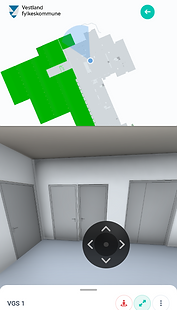
Intuitive navigation – Pan, zoom, search, filter, color, and walk through models effortlessly for a fully interactive experience.
-
Selective rendering – Display only the objects you want, tailoring the view for each user’s needs.
-
Accessibility-focused – Designed for all users, from professionals to the general public, making BIM easy to explore and understand.
-
Accessible anywhere – Work smoothly on both PC and mobile devices, keeping every stakeholder connected on the go.
-
Powered by Autodesk APS – Built on a best-in-class viewer platform for high performance, reliability, and seamless integration.

Integration and visualization
-
Seamless integration – Embed the Model Viewer directly into your own applications with minimal effort.
-
Connect third-party data – Combine BIM models with third-party data such as sensor readings, locks, or IoT systems directly in the viewer.
-
Interactive and accessible – Give every stakeholder the ability to explore, filter, and interact with live project data in an intuitive way.
-
One connected platform – Centralize BIM and external information in nPoint Nexus to break down silos and improve collaboration.

Export to other formats
-
Flexible exports – Choose between automatic or manual exports to match your workflow.
-
Broad format support – Convert models to IFC, Revit, DWG, JSON, GeoJSON, SVG, PDF, and more.
-
Effortless collaboration – Share models and data seamlessly without extra conversion steps.
-
Extended usability – Exported formats make your models easy to use in maps, third-party applications, analysis tools, and beyond.
