top of page
NEW
Metaroom × nPoint Plugin for Revit is now available!
Import Metaroom scans directly into Revit for faster as-built verification.

Metaroom Revit plugin
Capture existing conditions with the Metaroom Scan App and import the result into Revit using the nPoint Metaroom plugin.
Compare scans against your master model; detect deviations, merge verified objects, and review scan images, all in one Revit workflow.
Keep your as-built model accurate without leaving Revit.
In collaboration with

Note: The Metaroom Revit Plugin by nPoint is €200 per user / month. Requires an active Metaroom subscription.


Verify sites and update models up to 80% faster.
Key Features
Simple Import & Model viewing
Quickly import Metaroom export files into Revit using the nPoint plugin for Metaroom. Get full control over viewing and filtering, navigation, isolation, transparency and visibility.
Stay focused on what matters, without clutter.
Alignment & Deviation Checking
Place the scanned Metaroom model accurately against your existing Revit model.
Instantly see deviations between design and reality, making verification and coordination fast and reliable.
Transfer objects and manipulate your model
Transfer objects from the imported model into your master model as native Revit objects.
Navigate seamlessly through objects and make changes directly.
Images & Metadata Directly in Revit
Access rich scan metadata without leaving your BIM workflow. View Points of interest (POIs), images linked to locations and Metaroom-specific metadata.
All embedded directly in Revit for maximum usability.
The problem
Models drift from reality.
Buildings change. Revit models don’t update themselves. The gap between what the model shows and what’s actually built costs AEC teams hours of manual verification on every project.
Outdated models.
Back to site.
Again.
Days lost to manual comparison.
Deviations found too late.
From Scan to BIM with Precision
Scan rooms or entire buildings with your iPhone Pro or iPad Pro and export accurate 3D room models with Metaroom.
How it works
Scan your building with the Metaroom Scan App and access it in Metaroom Studio
Capture your existing building with ease using the Metaroom Scan App on iPhone Pro or iPad Pro.
Access your scan results in Metaroom Studio, refine the model, add data, and prepare everything for export.

Export Metaroom scan from Metaroom studio
Export the model files and metadata from Metaroom with nPoint Plugin for Revit.

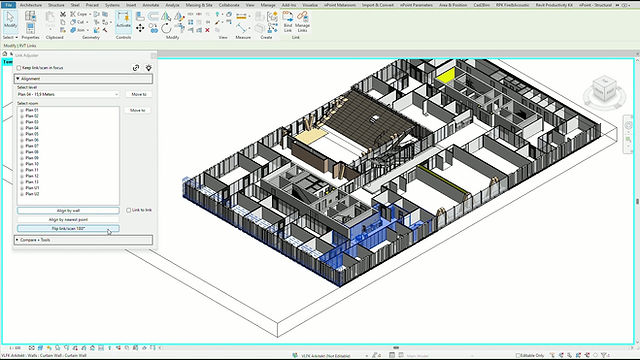
Import, link and align
Import the model file in to Revit using the nPoint plugin and align with existing model

Compare
Compare imported Metaroom model with your master model and instantly find deviations.
Use the built in compare setup to compare distinct object types and adjust the deviation thresholds to fit model requirements.
Transfer objects to the Revit model
Select objects in the imported Metaroom model and transfer into your existing Revit master model.
Objects are converted to real Revit objects.

Point of Interests and images
Visualize Point of interests and corresponding images

Form
Contact for access or questions
bottom of page